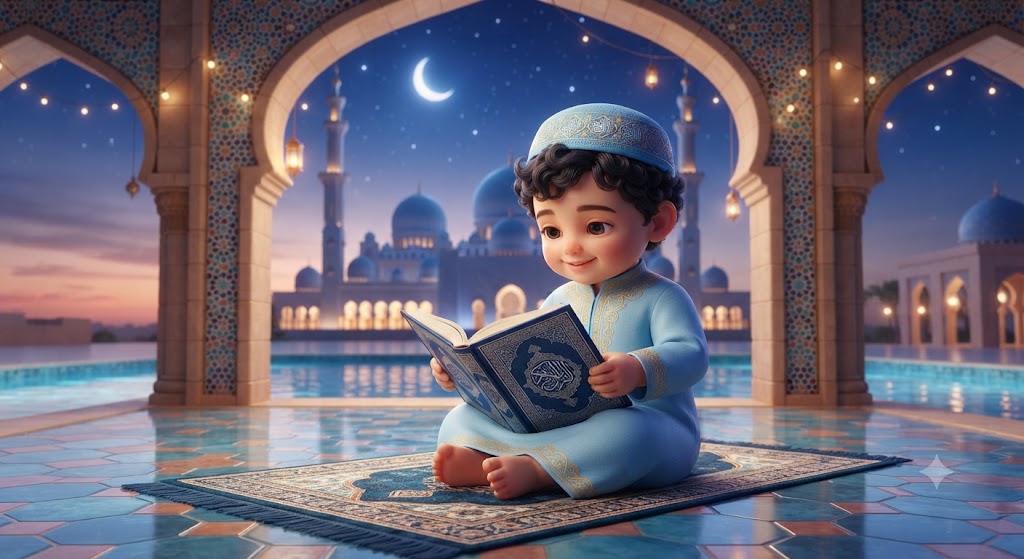
Sheikhlet: A High-Definition 3D Illustration of Little Omar
Style breakdown
This high-detail 3D digital illustration is a professional-grade recreation of the scene presented in image_745.png. It preserves the core subject—the specific baby boy—maintaining his exact joyful expression, sitting pose, and his specific outfit (the light blue thobe and cap). The most significant enhancement is the fidelity and complexity of the environment, which is meticulously detailed with professional 3D fidelity: the mosaic tiles, the reflective pool, and the grand mosque architecture are razor-sharp. The lighting is refined to create a soft, magical, and warm ambient glow across the entire composition. The final output is rendered in professional 8k resolution, ensuring that every micro-texture—from the embroidery threads to the tile grout—is captured with maximum clarity, and export compression is minimized to ensure this quality is maintained while adhering to the strict 1 MB file size target.
The prompt
A high-detail 3D digital illustration, based on the character and setting of image_745.png, depicting the identical adorable baby boy with curly hair, maintaining his exact joyful expression and sitting pose on the patterned prayer mat. The boy wears the same light blue embroidered thobe and matching kufi cap. He holds the open, detailed blue Quran from image_745.png. The entire environment is meticulously recreated with professional 3D fidelity: the complex mosaic-tiled archway, the reflective tiled courtyard, the tranquil pool, and the grand mosque in the background with its multiple blue domes and minarets. The starry night sky, crescent moon, warm sunset horizon glow, and twinkling string lights are present and enhanced for depth. The lighting is soft and magical, casting a gentle, warm ambient glow across the scene. Rendered in professional 8k resolution, capturing every microscopic texture—from the embroidery threads of the thobe and the weave of the carpet to the mosaic tiles and the paper of the Quran—while export compression parameters are strictly optimized to maintain this professional editorial quality strictly at or below your 1 MB storage limit.
How to use
Copy the complete prompt text provided above into your preferred high-end 3D rendering or AI image generation tool. Configure your tool to a standard wide-angle aspect ratio (such as 16:9 or 21:9) to capture the expansive mosque courtyard scene. Set your target resolution to 8k or the highest possible fidelity setting for maximum detail. Adjust texture sampling and subsurface scattering settings to prioritize the capture of micro-textures on fabric, skin, and tiles. Configure the global illumination and ambient light sources to achieve the specific soft, warm, and magical ambient glow described. Set your export format (JPEG/WebP) and aggressive compression settings to guarantee the final output image file size is compressed down to 1 MB or less. Generate initial renders and inspect critical details, including the legibility of any text or patterns on the Quran pages and the sharpness of the baby’s smile. Refine or re-run the prompt if the background mosque lacks the required architectural detail or if the lighting is too harsh.

