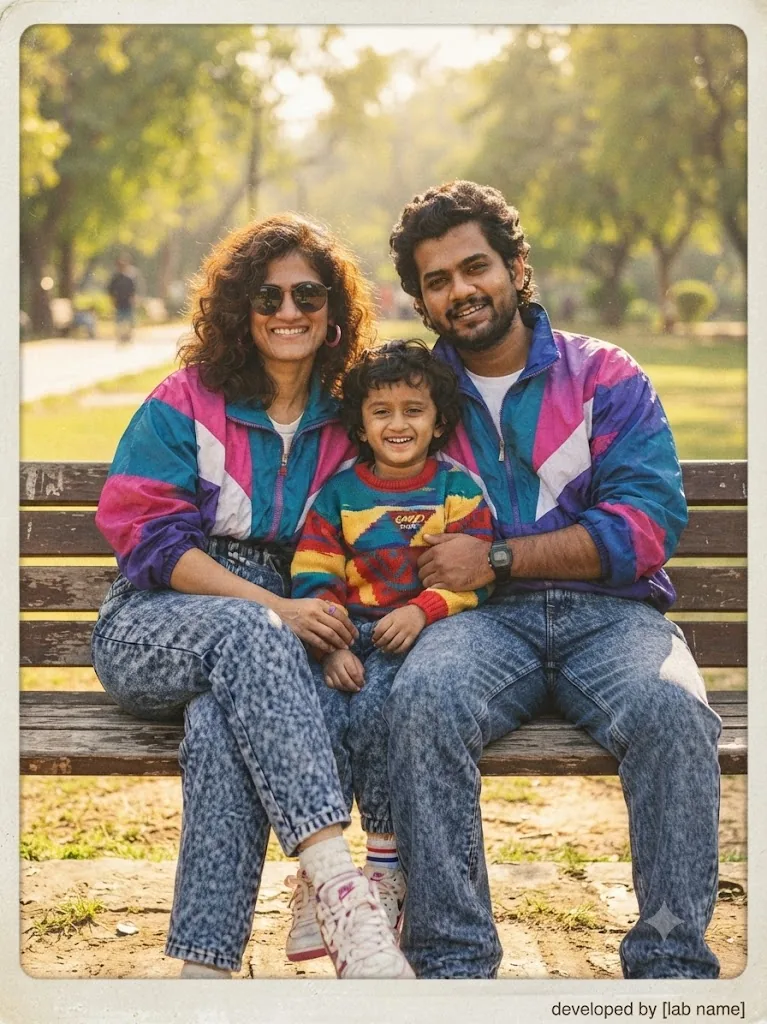
The 90s Fam-Snap: A Coordinated Acid-Wash Portrait
Style breakdown
This photograph is a highly detailed reconstruction of a 1990s-era family portrait, designed to evoke powerful nostalgia. The prompt prioritizes precise translation of the subjects' exact likenesses and specific, coordinated fashion choices. The key elements—such as the multi-colored (magenta, teal, purple, white) windbreakers and the high-waisted acid-wash denim worn by all three family members—are critical for establishing the era's identity. The composition also captures the specific, affectionate pose and warm smiles of the family. The lighting is warm and natural, simulating a sun-drenched afternoon. Crucially, the prompt specifies authentic analog artifacts like film grain, color shift, and a distressed border, making the final output indistinguishable from a genuine 1990s print. This approach bridges modern rendering quality with deep historical immersion, making it ideal for retro-themed lookbooks, nostalgic campaigns, or creative storytelling projects that require a high degree of authenticity.
The prompt
A professional color photograph meticulously styled as an authentic 1990s-era snapshot, capturing the South Asian family from image_154.png sitting closely together on a wooden bench outdoors. The mother, on the left with voluminous curly brown hair and sunglasses, wears the identical multi-panel (magenta, teal, purple, white) nylon windbreaker jacket and high-waisted acid-wash denim jeans. The father, on the right, also wears the matching multi-panel windbreaker and high-waisted acid-wash denim jeans, with his arm around their young son, who is wearing a perfectly matching colorful knit sweater. All three are smiling warmly at the camera. The background is a sun-drenched public park, softly blurred. Every detail, from the texture of the acid-wash denim to the specific color blocking of the windbreakers, is precisely rendered. The image is infused with period-correct film grain, a warm color cast, and subtle fading, presented within a slightly aged photo border with rounded corners.
How to use
Copy the complete prompt text provided above into your preferred advanced AI image generator or studio rendering workspace. Configure your generator to a standard vertical portrait aspect ratio (such as 4:5) to properly frame the group of three and the vertical background elements. Adjust the "Style Reference" or "Image Weight" settings (if available) to prioritize the likeness and clothing details from the original image while applying the film texture and pop-culture elements from the prompt text. Set your target resolution to high fidelity to capture the fine film grain and clothing textures, especially the micro-textures of the nylon windbreakers and the specific knit pattern of the son's sweater. Adjust lighting parameters to emphasize the warm, natural sunlight and flattering skin tones, avoiding harsh, clinical light. Set your export format and compression settings to guarantee the final output image file size is compressed down to 1 MB or less. Generate initial renders and inspect critical details: check for the correct multi-panel color-block patterns on all three windbreakers, confirm the legibility of the son's sweater graphic, and verify the presence of the aged film border. Refine or re-run the prompt if the film texture is too heavy or if the family resemblance requires more precision. Export the final chosen render to preserve the rich lifestyle details and professional editorial quality while strictly adhering to your 1 MB file size constraint.

