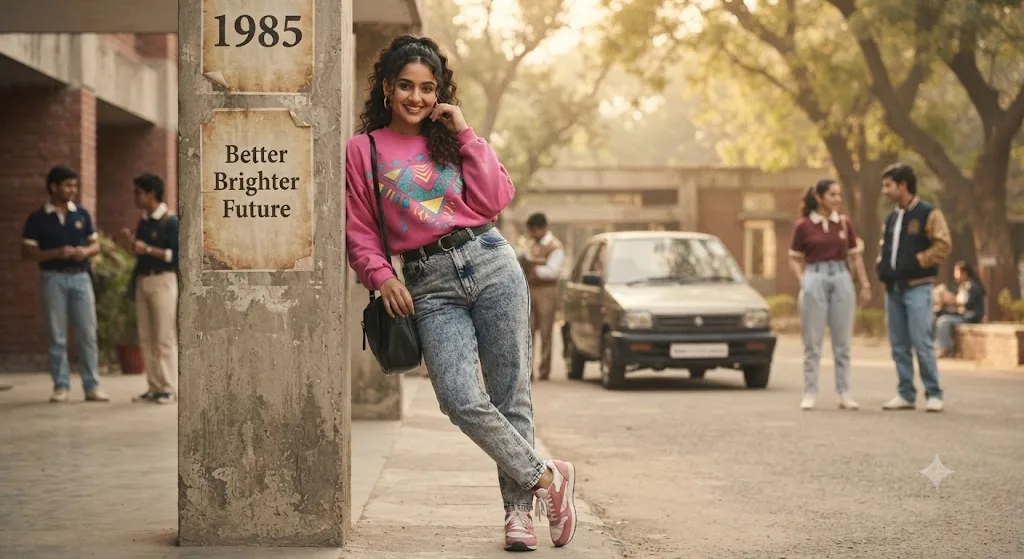
The 80s Vibe: A High-Definition Retro-Streetwear Portrait
Style breakdown
This high-definition portrait is a meticulous recreation of the original photo, elevating it from a period snapshot to a professional-grade, hyper-realistic digital asset. The prompt is architected to prioritize extreme textural and material fidelity: every micro-element—from the weave of the denim and the specific graphics on the sweatshirt to individual strands of hair and skin pores—is rendered with razor-sharp clarity. The composition precisely matches the subject's pose and engaging gaze. The background elements, including the crucial text on the pillar, are restored and defined with clarity, dissolving into a creamy bokeh to isolate the subject. This prompt balances profound visual detail with strict technical compression parameters (strictly 1 MB) to ensure the final output fits seamlessly into a curated, high-end digital asset library while preserving the nostalgic 80s lifestyle aesthetic.
The prompt
A hyper-realistic, full-body 8k resolution portrait capturing a young South Asian woman from image_121.png, leaning against a weathered concrete pillar in an outdoor campus setting, perfectly maintaining her likeness, smile, and pose. She is wearing the exact same oversized, vibrant pink graphic sweatshirt with geometric teal and yellow patterns, acid-wash high-waisted denim jeans with a black belt, and retro pink and white sneakers. Her curly dark hair is styled in an 80s half-up, half-down ponytail. She carries the same black shoulder bag and has gold hoop earrings. The concrete pillar shows the faded "1985" and "Better Brighter Future" posters from image_121.png with pristine clarity. The natural, soft-focus background features a classic 80s car (like a Maruti 800), other students in period-appropriate clothing, and trees, all captured with a deep, creamy bokeh (depth of field). The entire image has authentic vintage Kodak Gold 400 film grain, warm sepia tones, and a soft-focus, diffused light quality that evokes the 1980s analog aesthetic.
How to use
Copy the complete prompt text provided above into your preferred high-end AI image generator or studio rendering workspace. Configure your generator to a standard vertical portrait aspect ratio (such as 9:16 or 4:5) to properly frame the full-body composition and vertical depth of the pillar. Set your target resolution to 8k or the highest available fidelity setting to ensure micro-textures and graphic details are fully resolved. Adjust texture sampling and lighting parameters to emphasize the warm, diffused daylight and flattering skin tones. Set your export format (JPEG/WebP) and compression settings to guarantee the final output image file size is compressed down to 1 MB or less. Generate initial renders and inspect critical details, including the legibility of the poster text and the realism of the acid-wash denim texture. Refine or re-run the prompt if the background bokeh requires softer diffusion or if the clothing pattern definition needs more contrast. Export the final chosen render to preserve the rich cultural details and professional editorial quality while strictly adhering to your 1 MB file size constraint.

