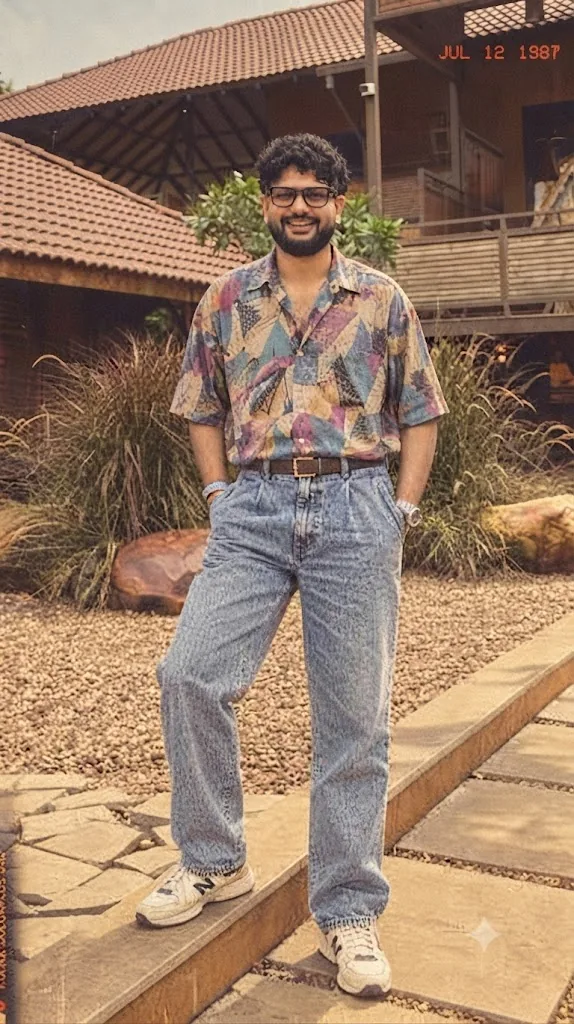
The Kodak Moment: A 1987 Retro-Fashion Portrait
Style breakdown
This photograph is a meticulous reconstruction of a specific moment in time, capturing the essence of 1987 Kodak film portraiture. The prompt is designed to translate not just the subject's physical appearance and clothing, but also the specific film stock aesthetic and the physical artifact of a 1980s photo print. Every element—from the precise pattern on the shirt and the brand of the sneakers to the weathered brickwork of the background buildings—is engineered for high fidelity. The "JUL 12 1987" date stamp is a crucial authenticity marker. The warm, golden light and the characteristic film grain and color shift are essential for creating the " Kodak Moment." This prompt ensures the final output is a seamless, high-quality digital asset that perfectly encapsulates the vintage, heritage-brand vibe of the original image.
The prompt
A full-body vintage Kodak color film photograph, dated "JUL 12 1987" in the upper-right corner, capturing a South Asian man matching the likeness from image_112.png. He is smiling directly at the camera with a confident, relaxed posture, hands in pockets. He is wearing the exact same oversized, patterned short-sleeve button-down shirt (with geometric and abstract motifs in muted pinks, blues, and yellows), high-waisted acid-wash denim jeans with front pleats, a brown leather belt, a silver watch, and cream-colored New Balance sneakers (model 574 or 990v1) seen in image_112.png. He has the same beard and glasses. The background is a warm-toned, slightly overgrown outdoor area with lush pampas grass, large boulders, and the tiled-roof, terracotta-colored buildings from image_112.png. The lighting is natural, golden afternoon sunlight. The entire image has a distinct, authentic 1980s film grain, slight color fading, warm sepia-like tint, and the specific red-and-yellow Kodak color borders characteristic of a 1980s analog print.
How to use
Copy the complete prompt text provided above into your preferred AI image generator (e.g., Midjourney, Stable Diffusion, DALL-E 3). Ensure your generator's settings are configured to a standard portrait aspect ratio to capture the full-body composition. Adjust the "Style Reference" or "Image Weight" (if using Midjourney) settings to prioritize the likeness and clothing from the original image_112.png while applying the film texture and date stamp from the prompt text. Set your target resolution to the highest available fidelity to capture the fine film grain and clothing details. Generate initial renders and inspect critical details: check for the presence and legibility of the "JUL 12 1987" date stamp, confirm the correctness of the shirt pattern, and verify the brand/color of the sneakers. Refine or re-run the prompt if the film texture is too heavy or if the date stamp is missing or incorrect. Export the final chosen render as a high-resolution digital file, suitable for use in a heritage brand lookbook, a vintage fashion advertisement, or a nostalgic social media campaign, strictly at or below the 1 MB storage limit.

