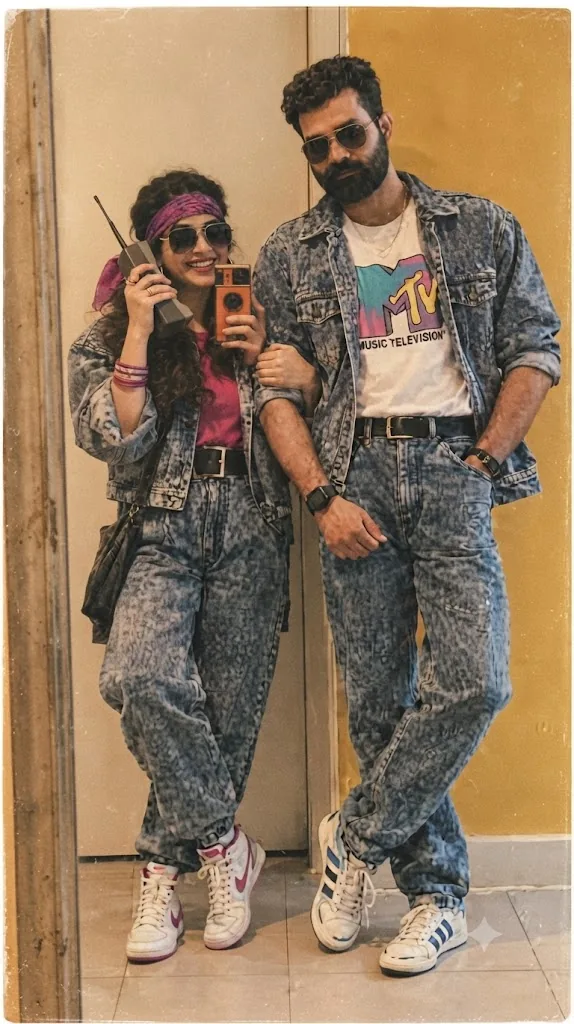
The 1990s Denim Duo: An MTV Retro Nostalgia Portrait
Style breakdown
This photograph is a meticulously crafted reconstruction of 1990s youth fashion and pop culture, designed to evoke a sense of retro nostalgia. The prompt is engineered to translate not just the subject's appearance, but also the specific aesthetic of analog photography from that era. Key elements—such as the acid-wash denim-on-denim (a signature look), the specific MTV graphic t-shirt, and the retro brick phone—are critical for establishing the decade's identity. The prompt prioritizes extreme fidelity to these details. The lighting is warm and diffused, emulating indoor studio settings, which enhances the vintage feel. Crucially, the prompt specifies authentic analog artifacts like film grain, a warm color shift towards sepia, and a film border, making the final output indistinguishable from a genuine 1990s print. This approach bridges modern rendering quality with deep historical immersion.
The prompt
A high-definition vintage studio photograph, styled to look like an analog 1990s film print, capturing a South Asian couple in full matching acid-wash denim outfits. The man, with a beard and sunglasses, is on the right, wearing an open acid-wash denim jacket over a white MTV Music Television t-shirt, matching acid-wash jeans with a black belt, and Adidas sneakers. The woman, also with sunglasses, is on the left, taking a mirror selfie with a retro brick phone. She wears a cropped acid-wash denim jacket over a pink t-shirt, matching high-waisted acid-wash jeans with a black belt, a purple headscarf, bangles, and Nike high-top sneakers. The background is a simple indoor wall with warm, textured lighting. The entire image has a soft, warm, sepia-like color grade, visible film grain, and a slight, authentic film border artifact, capturing the essence of 90s retro fashion and pop culture.
How to use
Copy the complete prompt text provided above into your preferred high-end AI image generator or studio rendering workspace. Ensure your generator's settings are configured to a standard portrait aspect ratio to properly frame the full-body composition. Adjust the "Style Reference" or "Image Weight" settings (if available) to prioritize the likeness and clothing from the original image while applying the film texture and pop-culture elements from the prompt text. Set your target resolution to the highest available fidelity to capture the fine film grain and clothing details. Generate initial renders and inspect critical details: check for the legibility of the "MTV Music Television" logo, confirm the brand/color of the sneakers, and verify the correctness of the acid-wash pattern. Refine or re-run the prompt if the film texture is too heavy or if the likeness is not precise. Export the final chosen render as a high-resolution digital file, suitable for use in a heritage brand lookbook, a vintage fashion advertisement, or a nostalgic social media campaign, strictly at or below the 1 MB storage limit.

