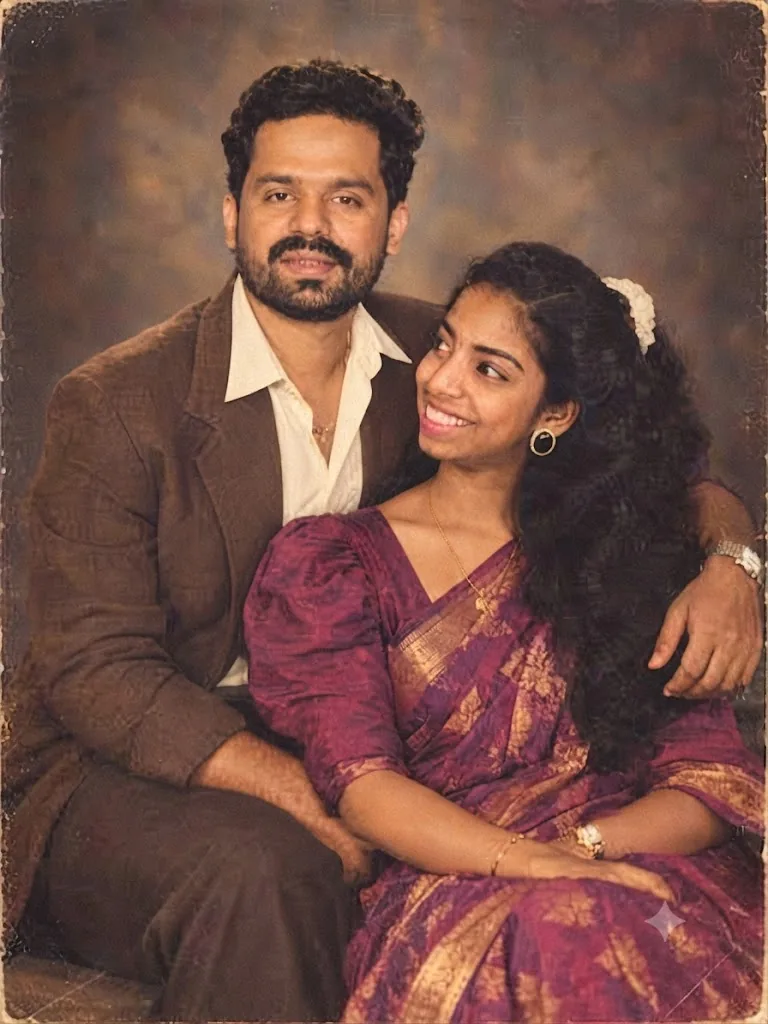
The Studio Romance: A 1970s Portrait
Style breakdown
This photograph is a detailed reconstruction of a 1970s indoor studio portrait, capturing the classic aesthetic of Indian portraiture from that era. The prompt translates both individual likeness and contextual cues, such as the characteristic painted studio backdrop and structured studio lighting. Key elements—including the brown blazer paired with an open-collared shirt, the magenta silk saree with puff sleeves, and traditional jewelry—establish the authentic cultural and temporal setting. Studio portraits from the 1970s relied heavily on staged, affectionate poses, which are replicated here as the man places his arm around the woman while she looks up toward him. The technical parameters specify analog artifacts like fine film grain, vignette lighting, and a distressed border to mimic the look of a physical photograph preserved in a family album. This approach combines narrative emotional storytelling with strict technical formatting to ensure the final output fits seamlessly within a curated vintage collection while staying optimized under a 1 MB file size constraint.
The prompt
A professional color studio photograph, meticulously styled as an authentic 1970s portrait of a South Indian couple against a mottled dark brown and amber painted canvas backdrop. The man, on the left with short dark curly hair and a trimmed beard and mustache, leans back slightly and looks directly forward with a gentle expression. He wears an unbuttoned white collared shirt under a classic brown blazer and matching trousers. The woman, seated slightly in front on the right, turns her head to look up affectionately at the man, smiling warmly. She wears a rich magenta and gold silk saree with puffy-sleeved matching blouse, accented with a gold necklace, round earrings, bracelets, a watch, and white flowers woven into her long, voluminous wavy dark hair. The lighting is soft studio vignette lighting, creating gentle highlights on their faces and deep shadows behind them. The entire image features authentic period-correct analog film grain, a warm sepia tone, soft focus edges, and a distressed, aged photo border with darkened corners.
How to use
Copy the complete prompt text provided above into your preferred advanced AI image generator or studio rendering workspace. Ensure your generator's settings are configured to a standard vertical portrait aspect ratio (such as 4:5) to properly frame the close-up studio composition. Adjust the "Style Reference" or "Image Weight" settings (if available) to prioritize the likeness of the couple while applying the film texture and studio backdrop details from the prompt text. Set your target resolution to high fidelity to capture the fine film grain, fabric textures of the silk saree, and clothing details. Adjust lighting parameters to simulate a vintage studio setup with soft directional light and a dark vignette background. Set your export format (JPEG/WebP) and compression settings to guarantee the final output image file size is compressed down to 1 MB or less. Generate initial renders and inspect critical details: check for the correct expression and posture, confirm the color accuracy of the magenta saree, and verify the aged photo border. Refine or re-run the prompt if the film texture is too heavy or if the likeness requires more precision. Export the final chosen render as a high-quality digital file, suitable for use in a heritage lookbook or a vintage-themed digital gallery, strictly at or below the 1 MB storage limit.

