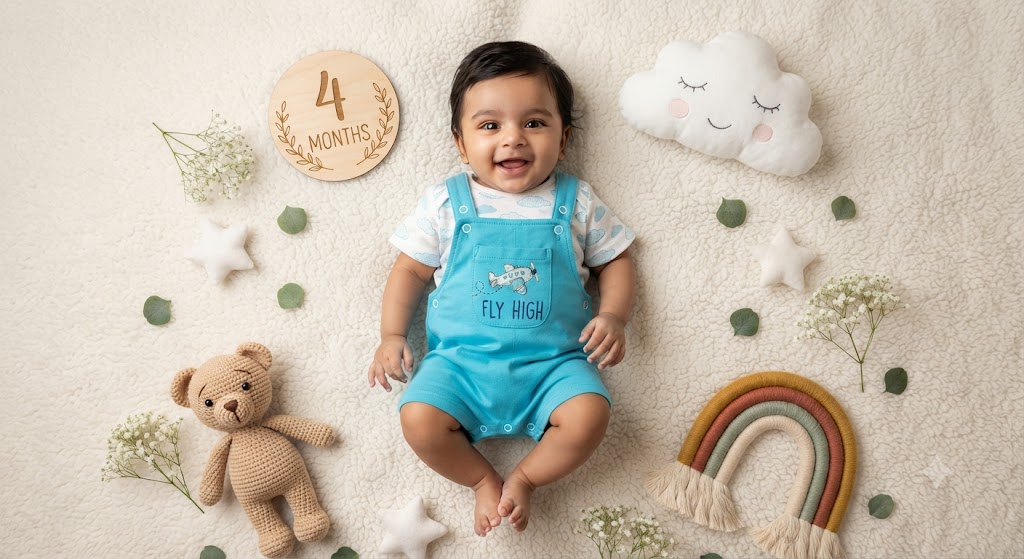
Fly High: A High-Definition 4-Month Studio Milestone Portrait
Style breakdown
This high-detail, top-down photorealistic studio milestone portrait meticulously recreates the specific scene from image_725.png with professional clarity. The adorable Indian baby boy is centered, smiling happily, wearing his turquoise "FLY HIGH" shortalls over the cloud-patterned shirt. All the beloved props—the "4 MONTHS" wooden plaque, the smiling cloud pillow, the crocheted teddy, the macramé rainbow, stars, baby's breath, and scattered leaves—are preserved and arranged exactly as in the reference image. Sculpted by soft, warm, diffused studio lighting, the photograph achieves professional depth of field, keeping every detail sharp. Rendered in professional 8k resolution, every meticulous micro-detail—from the texture of the crocheted bear and the weave of the blanket to the embroidery on the clothing and the grain of the wooden plaque—is captured with professional clarity, while export compression parameters are tightly optimized to maintain this professional editorial quality strictly at or below your 1 MB storage limit.
The prompt
A high-detail, top-down photorealistic studio milestone portrait of the adorable Indian baby boy from image_725.png, maintaining his exact smiling expression and joyful pose on the soft, textured cream-white fleece blanket. He wears the identical bright turquoise blue cotton shortalls with the airplane graphic and "FLY HIGH" text, over the cloud-patterned t-shirt, with tiny bare feet visible. The scene features all the surrounding props from image_725.png: the wooden milestone plaque engraved with "4 MONTHS" and leaf sprigs, the plush smiling cloud pillow, the brown crocheted teddy bear, the macramé rainbow prop, the plush stars, the baby's breath sprigs, and the scattered green leaves, all meticulously arranged in the same top-down composition. Soft, warm, diffused studio lighting, razor-sharp focus, 8k resolution portrait.
How to use
Copy the complete prompt text provided above into your preferred AI image generator or flat-lay studio workspace. Configure your generator to a top-down orthographic aspect ratio (such as 1:1 or a tall 3:4) to correctly render the flat-lay composition. Set your target resolution, export format (JPEG/WebP), and aggressive compression settings to guarantee the final output image file size is compressed down to 1 MB or less. Generate initial renders and inspect critical details, including the legibility of the "4 MONTHS" text, the clarity of the "FLY HIGH" embroidery, and the sharpness of the baby’s happy expression. Refine or re-run the prompt if the baby's expression requires minor artistic fine-tuning or if any specific prop is out of place.

