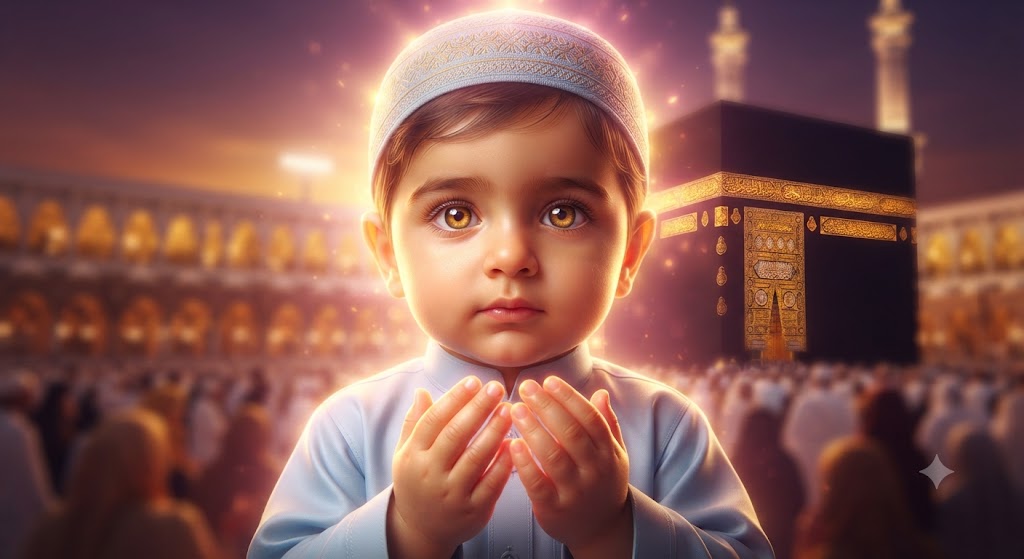
Noor-e-Makkah: A High-Definition Portrait of Little Zahir
Style breakdown
This high-definition portrait is a meticulous, professional-grade recreation of the scene in image_747.png. It preserves the core subject—the specific young boy—maintaining his exact likeness, large amber eyes, and his sitting pose with his hands in the Dua gesture. The background—the Kaaba and the surrounding mosque—is also preserved but rendered with significantly higher clarity and fidelity, making the golden inscriptions on the Kaaba truly glow. The lighting is refined, intensifying the heavenly golden halo effect into a palpable, soft, diffused light source that suffuses the entire scene with gilded spiritual warmth, creating beautiful light-blooms and reflections on his face and thobe. The final output is rendered in professional 8k resolution, ensuring that every micro-texture—from skin pores to fabric weave and gold embroidery—is captured with maximum clarity, and export compression is minimized to ensure this quality is maintained while adhering to the strict 1 MB file size target.
The prompt
A high-definition, hyper-photorealistic portrait of the identical young boy from image_747.png, maintaining his precise likeness, large amber eyes, and sitting pose with his hands held in the Dua (prayer) gesture. Every detail of his appearance—from the fine hair under his embroidered kufi cap to the weave of his light blue thobe and the individual skin pores—is rendered with extreme fidelity. The Kaaba in the softly blurred background is preserved in its exact position, but its golden inscriptions and the surrounding mosque architecture are reproduced with enhanced, razor-sharp clarity. The soft, heavenly golden halo effect around his head is intensified into a palpable light source, casting warm, gilded reflections and deep, golden-pink light-blooms over his entire face, hands, and clothing. The depth of field is very shallow, creating a beautiful, warm bokeh of the distant, soft-focused pilgrim crowd, while keeping the boy in critically sharp focus. Rendered in professional 8k resolution, capturing every micro-detail, while export compression parameters are tightly optimized to maintain this professional editorial quality strictly at or below your 1 MB storage limit.
How to use
Copy the complete prompt text provided above into your preferred AI image generator or studio portrait workspace. Configure your tool to a high-fidelity portrait aspect ratio (such as 4:5 or 16:9) to capture the boy and the background. Set your target resolution to 8k or the highest possible fidelity setting to achieve the requested micro-textures. Adjust texture sampling and subsurface scattering settings to prioritize the capture of photorealistic skin, fabric, and gold details. Configure the lighting sources and global illumination to achieve the specific soft, warm, and intense golden-pink glow and light-blooms described. Set your export format (JPEG/WebP) and aggressive compression settings to guarantee the final output image file size is compressed down to 1 MB or less. Generate initial renders and inspect critical details, including the legibility of any text on the Kaaba and the sharpness of the boy’s eyes and skin texture. Refine or re-run the prompt if the background clarity is too high and overpowers the subject, or if the lighting becomes harsh instead of soft and diffused. Export the final chosen render to preserve the rich textural details and professional editorial quality while strictly adhering to your 1 MB file size constraint.

