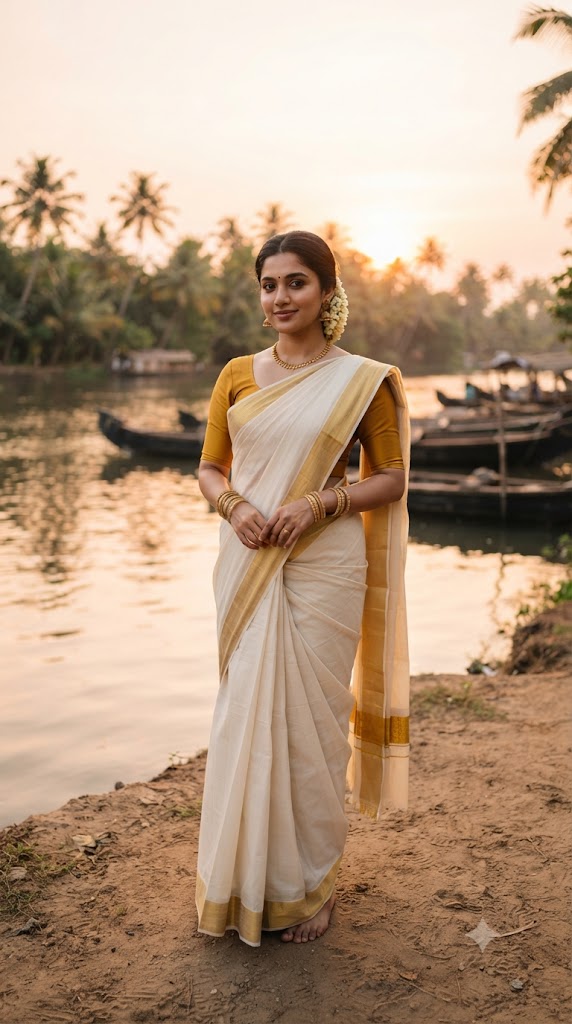
Kerala Backwater Sunset Portrait
Style breakdown
This prompt is meticulously designed to generate a culturally rich, high-end editorial image capturing the serene beauty of traditional South Indian aesthetics. By specifying a Kerala Kasavu saree—renowned for its off-white handloom cotton and distinct gold zari border—alongside regional elements like the jasmine gajra and traditional jhumka earrings, the prompt establishes a strong cultural foundation. The lighting cues, such as "cinematic soft backlighting" and "warm golden hour sky," work together to create a natural, flattering halo effect around the subject, enhancing the overall mood of tranquility. Placing the subject against the backdrop of tranquil Kerala backwaters with moored wooden boats and coconut palms grounds the portrait in an authentic geographic context. Furthermore, technical descriptors like "medium shot," "sharp focus," and "high-end cultural magazine editorial" instruct the AI model to prioritize shallow depth of field, crisp textures on the fabric and jewelry, and a polished, professional composition reminiscent of a glossy lifestyle publication.
The prompt
A professional medium shot studio-quality portrait of a serene young South Asian woman with dark hair tied in a low bun adorned with a white jasmine gajra, standing gracefully on a sandy riverbank at sunset. She is wearing a classic Kerala Kasavu saree featuring an off-white cotton fabric with a rich gold zari border, paired with a matching mustard yellow short-sleeve blouse, a delicate gold necklace, traditional jhumka earrings, and stacked gold bangles. The background features a tranquil backwater river with wooden boats moored along the shore, framed by lush coconut palm trees under a warm golden hour sky. Cinematic soft backlighting, sharp focus on the subject, high-end cultural magazine editorial, photorealistic, 8k resolution.
How to use
Copy the Prompt: Select and copy the entire text provided in the "Prompt Text" section above. Open Image Generator: Launch your preferred AI image generation tool (e.g., Midjourney, DALL-E 3, Stable Diffusion). Paste and Generate: Paste the copied text into the prompt input field of the generator and execute the generation command. Refine (Optional): If the output is not exactly as expected, you can tweak the prompt (e.g., adjusting the subject's pose or the intensity of the sunset) and regenerate.

