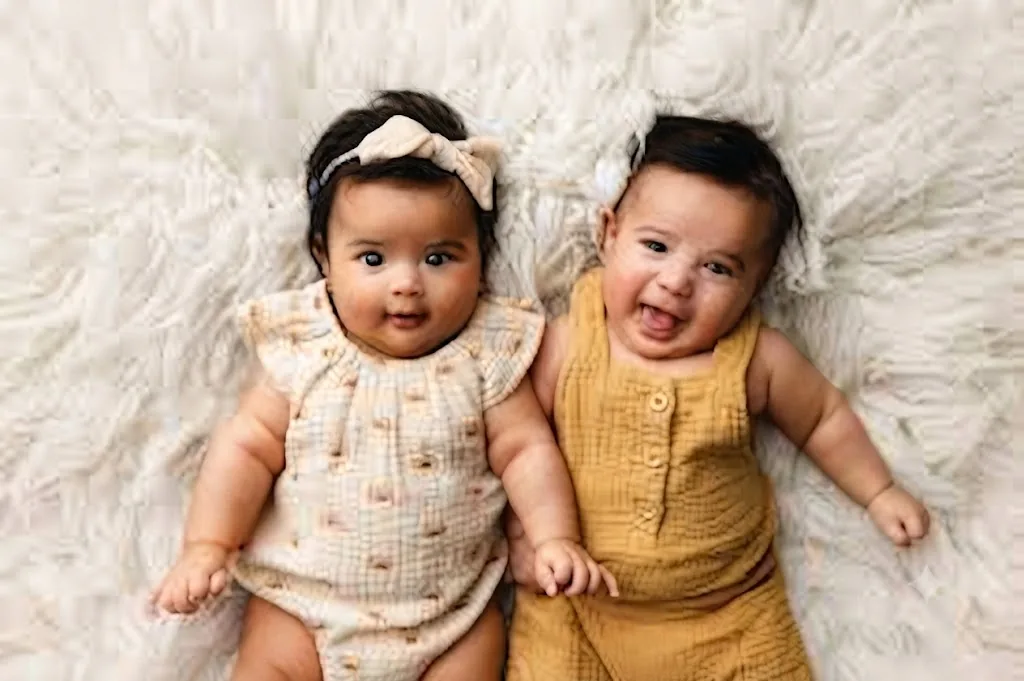
The Joyful Twins: A Cozy Newborn Studio Portrait
Style breakdown
This photograph captures a heartwarming, professional studio portrait of infant twins designed to evoke purity, joy, and familial warmth. The prompt precisely details the subject placement, engaging expressions, and coordinating clothing choices, such as the ruffled cream romper and the buttoned mustard-yellow attire, which establish a cohesive aesthetic. The top-down flat-lay perspective provides a modern, clean composition that highlights the babies against a luxurious, highly textured white faux-fur backdrop. Studio lighting is carefully balanced to deliver a bright, airy feel while softening shadows to emphasize delicate infant features and natural skin textures. By harmonizing a warm color palette with minimalist staging, the imagery bridges contemporary lifestyle trends and timeless portraiture. Finally, the technical workflow prioritizes efficient digital optimization to ensure the final asset remains crisp, vibrant, and strictly under the 1 MB storage constraint.
The prompt
A professional top-down studio photograph of two happy infant twins lying side-by-side on a plush, textured white faux-fur blanket. The baby on the left, with dark hair and a cream bow headband, wears a light beige cotton romper with a subtle pattern and ruffled sleeves, looking curiously at the camera. The baby on the right, with dark hair and a joyful, smiling expression, wears a mustard-yellow textured cotton romper with front buttons. The lighting is soft, bright, and evenly diffused, capturing warm skin tones and natural expressions without harsh shadows. The composition is a flat lay angle from directly above, focusing sharply on the infants against the cozy, cloud-like white background. The color palette features warm mustard yellows, soft cream tones, and neutral whites, creating a clean, joyful, and timeless aesthetic.
How to use
Copy the complete prompt text provided above into your preferred advanced AI image generator or studio rendering workspace. Configure your generator's aspect ratio to a square or a standard 4:5 vertical layout, depending on your preferred framing for top-down shots. Adjust style reference or image weight parameters to maintain high facial likeness and clear fabric textures. Set target rendering resolution to high fidelity to ensure crisp details on the faux-fur texture and baby clothing weaves. Fine-tune lighting options to simulate bright, soft, evenly diffused natural studio illumination. Apply export format specifications (JPEG/WebP) with compression optimization to guarantee the final file size is strictly at or below 1 MB. Generate initial renders and inspect critical details: check for clear expressions, accurate clothing colors, and seamless texture blending on the background. Refine or re-run the prompt if adjustments to positioning or lighting brightness are necessary. Export the final chosen asset for use in digital baby albums, birth announcements, or family portrait galleries.

