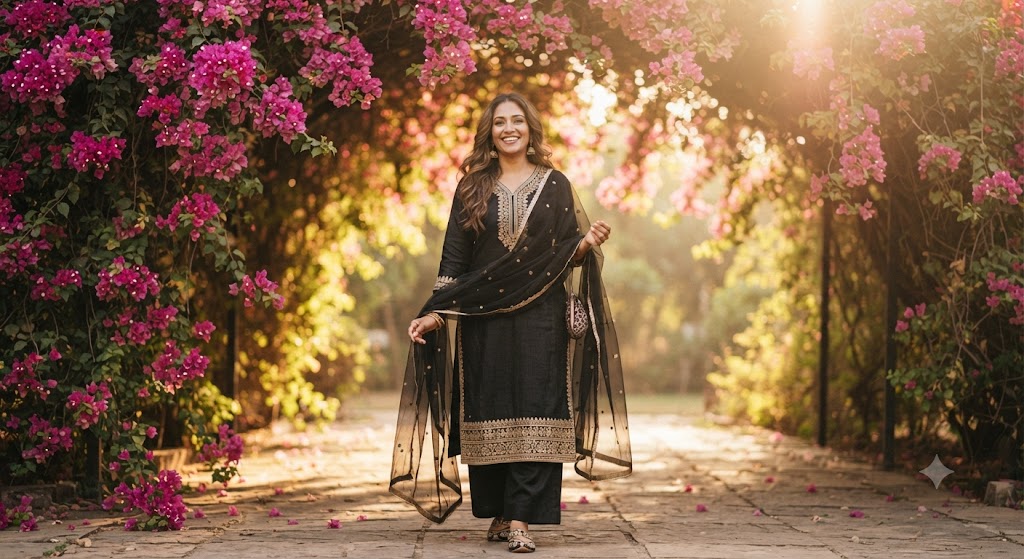
Bougainvillea Belle: A High-Definition 8k Portrait
Style breakdown
This high-definition portrait is a meticulous, professional-grade recreation of the scene in image_773.png. It preserves the core subject—the specific South Asian woman—maintaining her exact likeness, joyful expression, and her position walking toward the camera. The most significant enhancement is the fidelity and complexity of the textures and background. Every element, from the individual strands of hair and skin pores to the specific thread count of the gold embroidery and the pattern on her mojari shoes, is rendered with "razor-sharp clarity" and "extreme fidelity," moving from a good photograph to a highly detailed editorial portrait. The background bougainvillea and golden-hour light are refined to show deeper, more layered detail. The final output is rendered in professional 8k resolution, ensuring that every micro-texture is captured with maximum clarity, and export compression is minimized to ensure this quality is maintained while adhering to the strict 1 MB file size target.
The prompt
A high-definition, hyper-photorealistic portrait of the identical South Asian woman from image_773.png, maintaining her precise pose, joyful expression, and the act of walking. Every element from image_773.png is preserved and enhanced with extreme fidelity: the intricate gold zari embroidery on the black ethnic suit is razor-sharp and distinct, showing individual thread work on the neck, hem, and sleeve borders. The black net dupatta with its delicate sequin patterns is reproduced with microscopic fidelity, and her traditional gold jhumka earrings and patterned mojari shoes are in crisp focus. The cascading magenta and pink bougainvillea flowers framing the archway are rendered with exceptional sharpness and depth, showing individual bracts. The golden-hour sunbeams filtering through the canopy create a defined, soft, atmospheric haze and a beautiful, complex lens flare, adding a luminous quality to her hair and skin. The stone pathway texture is palpable. The entire scene is captured in stunning 8k resolution, while export compression parameters are tightly optimized to maintain this professional editorial quality strictly at or below your 1 MB storage limit.
How to use
Copy the complete prompt text provided above into your preferred high-end AI image generator or studio rendering workspace. Configure your generator to a standard portrait aspect ratio (such as 16:9) to frame the woman and the depth of the archway. Set your target resolution to 8k or the highest possible fidelity setting to achieve the requested micro-textures. Adjust texture sampling and subsurface scattering settings to prioritize the capture of photorealistic skin and fabric details. Configure the lighting sources and global illumination to achieve the specific soft, luminous, and diffused golden-hour lens flare. Set your export format (JPEG/WebP) and aggressive compression settings to guarantee the final output image file size is compressed down to 1 MB or less. Generate initial renders and inspect critical details, including the sharpness of the embroidery and the clarity of the shoes. Refine or re-run the prompt if the background clarity becomes too dominant or if the lighting becomes harsh instead of soft and diffused.

