The Festival of Lights: A High-Definition 8k Cultural Portrait
Style breakdown
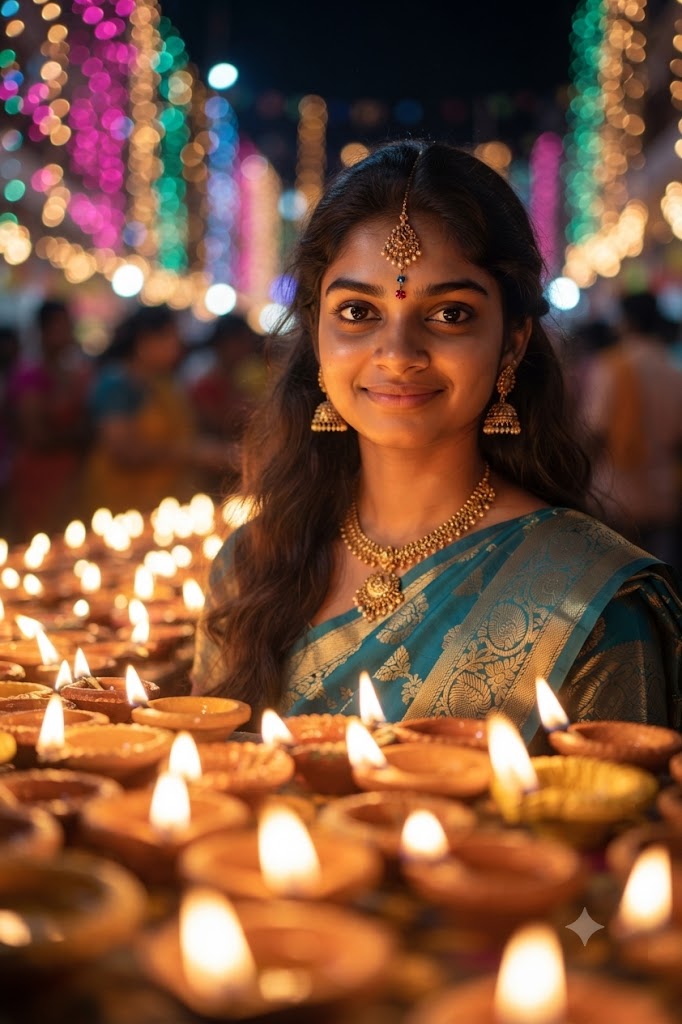
This high-definition portrait captures a serene and celebratory evening scene featuring a young woman participating in the Diwali festival of lights. The composition centers on her welcoming smile and detailed ethnic attire, while the foreground is dramatically filled with the soft, warm glow of numerous clay oil lamps (diyas). The prompt architecture prioritizes extreme textural and material fidelity: every micro-element—from the intricate patterns of her silk saree and the fine filigree of her gold jewelry to the individual strands of hair and the rich bokeh of the distant festival lights—is rendered with razor-sharp clarity. The low-light ambiance, sculpted entirely by the foreground diyas, creates a dramatic yet soft key light that accentuates facial contours and evokes a profound sense of cultural warmth. Engineered for professional-grade rendering pipelines, this prompt bridges cultural storytelling with strict technical optimization parameters to ensure the final output fits seamlessly into a curated 8k digital asset library while strictly adhering to the 1 MB file size constraint.
The prompt
A high-definition, hyper-photorealistic 8k resolution low-light night portrait of a graceful young South Asian woman with dark wavy hair looking directly at the camera with a warm, gentle smile. Every detail is rendered with microscopic fidelity: her natural skin micro-textures, traditional maang tikka, ornate gold jhumka earrings, and intricate gold necklace are captured with pristine clarity. She wears a beautifully patterned silk saree in teal and gold. The foreground is filled with a close-up, shallow depth of field (bokeh) of countless glowing earthen diyas (oil lamps), creating a sea of warm, flickering light across the frame that illuminates her face. The background is a deeply blurred (intense bokeh) festive night scene with colorful fairy lights and distant festival goers, creating a magical ambiance. Captured with stunning 8k clarity, a very shallow depth of field, and tightly optimized export parameters to maintain professional editorial quality strictly at or below your 1 MB storage limit.
How to use
Copy the complete prompt text provided above into your preferred high-end AI image generator or studio rendering workspace. Configure your generator to a standard vertical or near-square portrait aspect ratio (such as 4:5) to properly frame the close-up of the subject and the foreground lamp field. Set your target resolution to 8k or the highest available fidelity setting to ensure micro-textures, jewelry details, and fabric patterns are fully resolved. Adjust texture sampling and lighting parameters to emphasize the warm, intimate illumination cast by the foreground diyas against the dark night atmosphere. Set your export format (JPEG/WebP) and compression settings to guarantee the final output image file size is compressed down to 1 MB or less. Generate initial renders and inspect critical details, including the clarity of the subject's expression and the realism of the low-light skin tones. Refine or re-run the prompt if the diya glow needs more softness or if the background bokeh requires tighter diffusion. Export the final chosen render to preserve the rich cultural details and professional editorial quality while strictly adhering to your 1 MB file size constraint.

