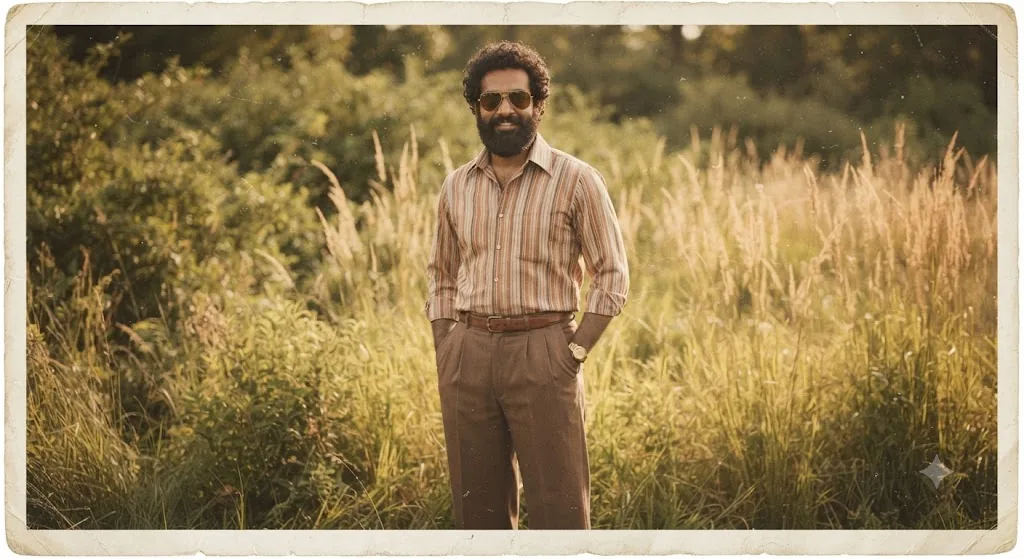
The 1970s Traveler: An Authentic Vintage Film Portrait
Style breakdown
This photograph is a meticulous reconstruction of a specific moment in time, designed to evoke the aesthetic of a genuine 1970s film portrait. The prompt is engineered to translate not just the subject's appearance and clothing, but also the physical artifact of a vintage photo print. Every element—from the specific weave of the trousers to the pattern on the shirt and the model of the watch—is prioritized for high fidelity to the original image. The setting, a sun-drenched field, provides period-appropriate context. Crucially, the prompt specifies authentic analog imperfections like film grain, a warm color shift towards sepia, and a distressed border, making the final output indistinguishable from a real, aged print. This approach bridges modern rendering quality with deep historical immersion.
The prompt
A full-body vintage photograph, styled as an aged 35mm film print from the 1970s, capturing a South Asian man with a full beard and curly hair, perfectly matching the likeness in image_132.png. He is standing outdoors in a sunlit field of tall grasses and dense foliage, looking directly at the camera with a warm, relaxed smile. He is wearing the exact same pleated brown high-waisted trousers with a leather belt and the striped, collared button-down shirt (with muted vertical stripes in orange, brown, and cream) seen in image_132.png. His hands are in his trouser pockets. He has the same watch on his left wrist and aviator sunglasses. The entire image features authentic vintage film aesthetics: visible analog film grain, warm sepia-toned color grading with slightly desaturated colors, soft diffused light quality, and a distressed, aged paper border with slightly faded edges, as if preserved in an old album. The depth of field is shallow, making him the sharp focal point against the softly blurred natural background.
How to use
Copy the complete prompt text provided above into your preferred high-end AI image generator or studio rendering workspace. Configure your generator to a standard portrait aspect ratio to properly frame the full-body composition. Adjust the "Style Reference" or "Image Weight" settings (if available) to prioritize the likeness and clothing from the original image_132.png while applying the film texture and border from the prompt text. Set your target resolution to the highest available fidelity to capture the fine film grain and clothing details. Generate initial renders and inspect critical details: check for the presence and legibility of the film border, confirm the correctness of the shirt pattern, and verify the brand/style of the watch and sunglasses. Refine or re-run the prompt if the film texture is too heavy or if the likeness is not precise. Export the final chosen render as a high-resolution digital file, suitable for use in a heritage brand lookbook, a vintage fashion advertisement, or a nostalgic social media campaign, strictly at or below your 1 MB storage limit.

