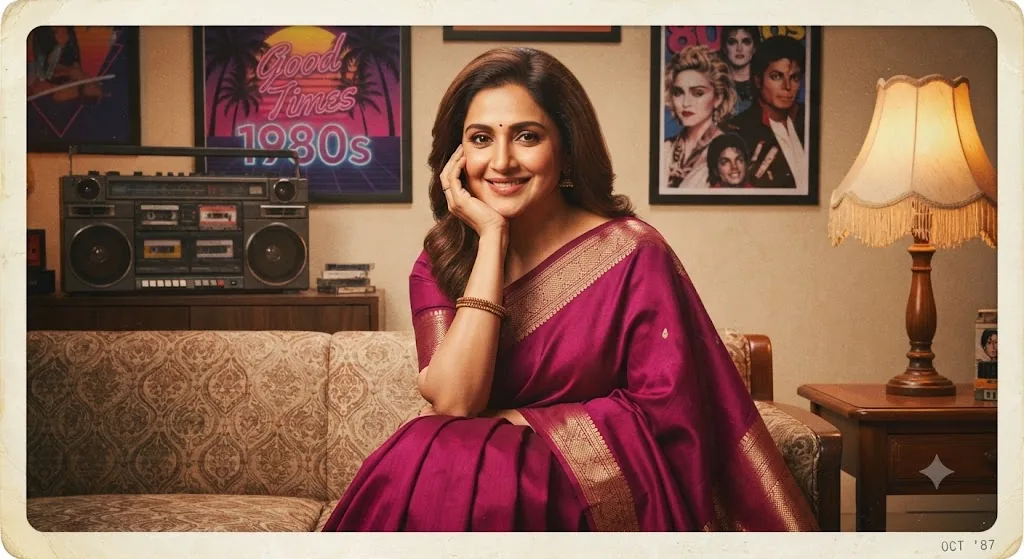
The Magenta Dream: A 1980s-Inspired Portrait
Style breakdown
This photograph is a detailed reconstruction of an indoor studio portrait from the 1980s, designed to evoke powerful nostalgia. The prompt is engineered to translate not just the subject's likeness, but the entire cultural context and fashion aesthetic. Key elements—such as the specific magenta saree with gold zari work, the traditional jhumka earrings, and the classic portrait posing—are critical for establishing the decade's identity. The setting is not just a generic room but an explicitly detailed "1980s-inspired" environment, adding layers of narrative depth. The lighting is engineered to be soft and diffused, simulating a typical indoor setup which flattens the contrast and enhances the retro feel. Crucially, the prompt specifies authentic analog artifacts like film grain, color shift, and a distressed border, making the final output indistinguishable from a genuine 1980s film photograph. This approach bridges cultural storytelling with strict technical compression parameters to ensure the final asset is optimized for digital use, strictly adhering to the 1 MB file size limit.
The prompt
A professional studio photograph, meticulously styled as an authentic 1980s cinematic portrait. The image captures the woman from image_217.png with her identical likeness, pose, and warm smile, wearing the same deep magenta silk saree with intricate gold zari border work. She is seated on a patterned vintage couch, resting her head on her hand as in image_217.png. The background is richly detailed with quintessential 1980s decor: a stacked cassette boombox with cassette tapes, framed posters including one with tropical palm trees and neon typography (like "Good Times" and "1980s"), framed portraits of 80s icons, and a fringed table lamp on a wooden side table. The entire photograph exhibits period-correct analog film grain, a rich, warm color cast (Kodachrome aesthetic), soft, diffused studio lighting, and is framed by a slightly distressed, aged photo border with rounded, yellowed corners and a subtle paper texture.
How to use
Copy the complete prompt text provided above into your preferred advanced AI image generator or studio rendering workspace. Ensure your generator's settings are configured to a standard vertical portrait aspect ratio (such as 4:5) to properly frame the close-up of the seated woman. Adjust the "Style Reference" or "Image Weight" settings (if available) to prioritize the likeness of the woman while applying the film texture and clothing patterns from the prompt text. Set your target resolution to high fidelity to capture the fine film grain, fabric textures, and facial features. Adjust lighting parameters to emphasize the soft, natural indoor daylight for flattering skin tones and deep, rich colors, avoiding harsh, clinical light. Set your export format (JPEG/WebP) and compression settings to guarantee the final output image file size is compressed down to 1 MB or less. Generate initial renders and inspect critical details: check for the correct saree color and border pattern, confirm the presence and placement of the jhumka earrings and bangles, and verify the presence and quality of the aged film border. Refine or re-run the prompt if the film texture is too heavy or if the likeness requires more precision. Export the final chosen render as a high-quality digital file, suitable for use in a heritage brand lookbook, a vintage fashion advertisement, or a nostalgic social media campaign, strictly at or below the 1 MB storage limit.

